By Muhammad Ibrahim · Published October 27, 2026 · 8 min read
Basic Logic Gates Lab: Verify AND, OR and NOT with the 7408, 7432 and 7404
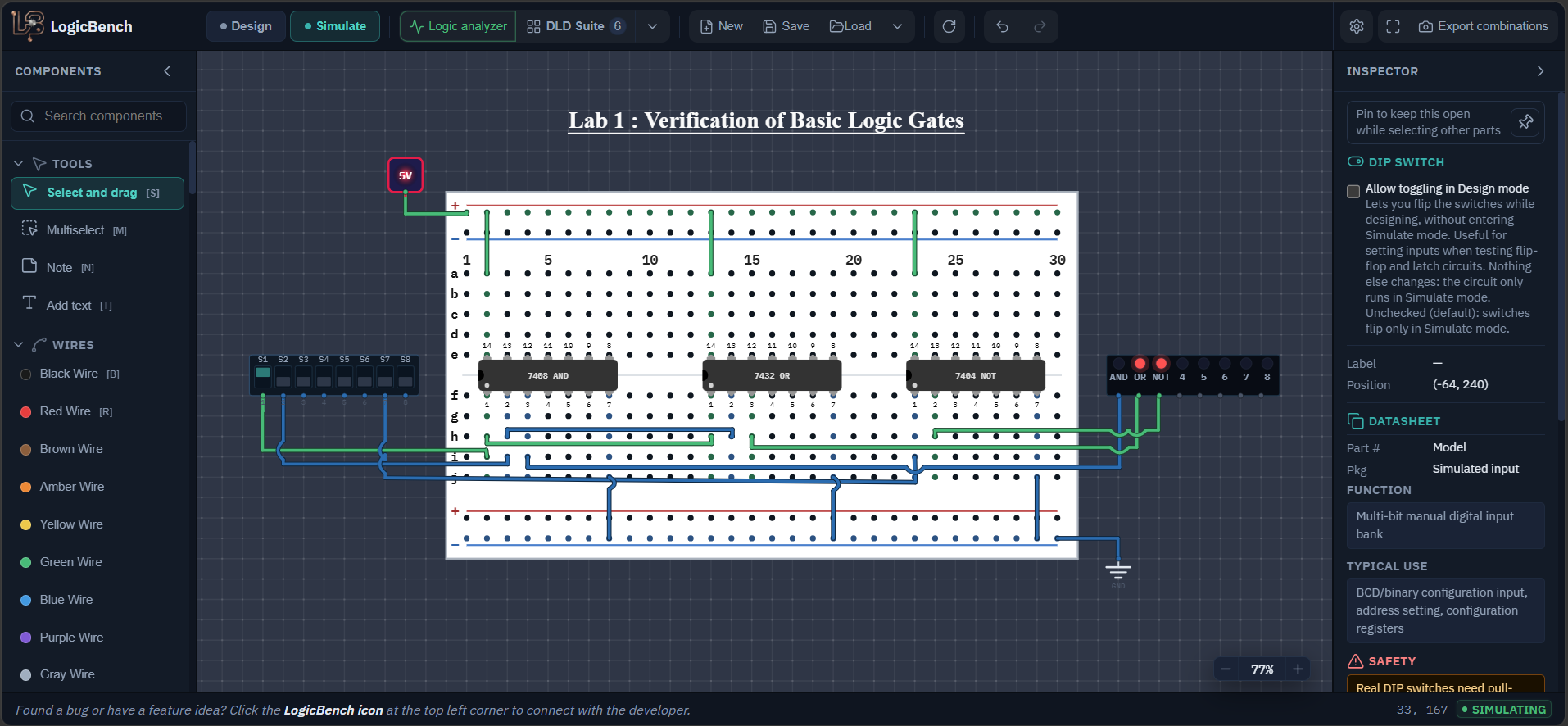
This is the first circuit from my DLD lab. You take one gate from three different chips, connect switches to the inputs, put an LED on every output and check that the LEDs follow the truth tables from your textbook. It looks too easy to need a tutorial, but this is the lab where you learn the things every later lab depends on: how to count pins on a DIP-14 chip, where the power pins are, and what to check when an output does nothing. Get these right here and the later labs go much faster.
- CHIPS
- 7408, 7432, 7404
- GATES USED
- 3, one on each chip
- INPUTS
- 3 switches (S1, S2, S7)
- OUTPUTS
- 3 LEDs (AND, OR, NOT)
Components needed for the logic gates experiment
- A 7408 (quad 2-input AND), a 7432 (quad 2-input OR) and a 7404 (hex inverter)
- One DIP switch. I used the 8-bit one but only S1, S2 and S7 are wired
- One Light Bar. I used the 8-LED one and only the first three LEDs are wired
- A Regulated +5V Power part, a Ground (GND) part and one half-size breadboard
- Or skip the building and open the circuit file from the box below
Open the circuit
This is the exact circuit from the lab. It opens on the canvas ready to run, so switch to Simulate and flip S1, S2 and S7.
7408, 7432 and 7404 pin diagram
Notch at the top, pin 1 at the top left. Pins count down the left side and then up the right side. Green is +5 V, black is ground and brown pins are outputs. The 7404 has a different layout from the other two.
AND, OR and NOT gate circuit diagram
The circuit as a gate diagram. The small numbers next to each gate are the chip pin numbers, so you can wire the breadboard straight from this picture.
How to verify AND, OR and NOT gates on a breadboard
Learn how to count pins on a DIP-14 chip
Hold the chip with the notch (the small half circle) at the top. Pin 1 is the top left pin. Count down the left side to pin 7, then cross over and count up the right side to pin 14. So pin 7 is bottom left and pin 14 is top right. All three chips in this lab are laid out the same way, with pin 14 as +5 V and pin 7 as ground, which is why the wiring pattern repeats.
If you forget what a pin does, look at the datasheet of the real part. The 7408, 7432 and 7404 in LogicBench are modelled on the SN74LS08, SN74LS32 and SN74LS04.
Place the chips and power them before you wire any logic
Add AND (7408), OR (7432) and NOT (7404) from the component library and put them on the breadboard. Add Regulated +5V Power and Ground (GND). Connect +5 V to the positive rail and ground to the negative rail. Then connect pin 14 of each chip to the positive rail and pin 7 of each chip to the negative rail.
Do all three chips now. A chip with no power gives a dead output, and a dead output looks exactly like a mistake in your logic wiring. It is much easier to rule power out first.
Connect the two switches to the AND and OR gates
Wire S1 to pin 1 of the 7408 and also to pin 1 of the 7432. Wire S2 to pin 2 of the 7408 and also to pin 2 of the 7432. Both gates share the same two switches on purpose. That way one switch position shows you the AND result and the OR result for exactly the same inputs, and you can compare them straight away.
Give the NOT gate its own switch
Wire S7 to pin 1 of the 7404. The inverted signal comes out on pin 2. I used a separate switch here so the inverter can be tested on its own, without S1 and S2 getting in the way.
Add the LEDs and rename them
Connect pin 3 of the 7408 to the first LED of the light bar, pin 3 of the 7432 to the second LED and pin 2 of the 7404 to the third LED. The light bar has no ground pin of its own, so there is nothing else to wire.
Double-click an LED on the light bar to rename it. I named mine AND, OR and NOT so I never have to remember which is which. I left the switches as S1, S2 and S7.
Switch to Simulate and go through the tables
Click Simulate. Step S1 and S2 through 00, 01, 10 and 11 and note the AND and OR LEDs each time. Then turn S7 on and off and watch the NOT LED. Compare everything with the truth tables below.
If you need results for a lab report, Export combinations in the toolbar saves an image of every input combination plus a CSV file.
Pin connections for the logic gates circuit
| Signal | Connects to | What it does |
|---|---|---|
| S1 | 7408 pin 1 and 7432 pin 1 | First input of the AND gate and the OR gate |
| S2 | 7408 pin 2 and 7432 pin 2 | Second input of both gates |
| 7408 pin 3 | Light bar LED 1 (AND) | Output of the AND gate |
| 7432 pin 3 | Light bar LED 2 (OR) | Output of the OR gate |
| S7 | 7404 pin 1 | Input of the NOT gate |
| 7404 pin 2 | Light bar LED 3 (NOT) | Output of the NOT gate |
| +5 V and GND | Pin 14 and pin 7 of all three chips | Power for the chips |
AND and OR gate truth table
| S1 | S2 | AND | OR |
|---|---|---|---|
| 0 | 0 | 0 | 0 |
| 0 | 1 | 0 | 1 |
| 1 | 0 | 0 | 1 |
| 1 | 1 | 1 | 1 |
NOT gate truth table
| S7 | NOT |
|---|---|
| 0 | 1 |
| 1 | 0 |
How AND, OR and NOT gates work
What each gate is really doing
AND is the strict gate. The output is 1 only when every input is 1, so only one row out of four gives a 1. OR is the easy gate. The output is 0 only when every input is 0, so three rows out of four give a 1. NOT has a single input and just flips it. If you remember only that, you can rebuild every table in this lab from memory. It is also why AND is used when all conditions must be true and OR is used when any one of them is enough.
What HIGH and LOW mean on these chips
These are 74LS parts. An input is read as HIGH when it is at least 2.0 V and as LOW when it is at most 0.8 V. Anything between those two values is undefined. The outputs are better than the inputs need: a HIGH output is at least 2.7 V and a LOW output is at most 0.5 V, so there is a safety gap between what one gate sends and what the next gate needs. This gap is also one reason an unconnected input is a problem. An open 74LS input usually reads as a HIGH, but that is not guaranteed and it picks up noise, so you should never rely on it. In LogicBench an open input shows up as FLOATING.
Four gates on a chip, and only one is used
The 7408 holds four AND gates and this lab uses one of them. The inputs and outputs are pins 1 and 2 into 3, 4 and 5 into 6, 9 and 10 into 8, and 12 and 13 into 11. The 7432 uses the same pin pattern. The 7404 is different. It has six inverters, each with one input and one output: pin 1 to 2, 3 to 4, 5 to 6, 9 to 8, 11 to 10 and 13 to 12. On the right half of the 7404 the output is the lower pin number, which is easy to get wrong the first time. You will use the unused gates in the next labs.
Speed
The datasheet entries in LogicBench give a maximum propagation delay of 15 ns for these three gates. You cannot see that on an LED, the output seems to change the moment you flip the switch. It starts to matter later, when gates are chained together or when a clock is involved.
Expected results of the logic gates experiment
- The AND LED is on only when S1 and S2 are both on.
- The OR LED is off only when S1 and S2 are both off.
- With S1 on and S2 off (or the other way round) the AND LED is off and the OR LED is on. That is the row where the two gates differ.
- The NOT LED is on when S7 is off and off when S7 is on. S1 and S2 do not change it.
Logic gate circuit not working? Common problems
No LED ever lights
Check pin 14 and pin 7 on each chip, one chip at a time. Then check that the +5 V part and the Ground part are really connected to the rails, and that you are in Simulate mode and not in Design mode.
An LED simply copies one of the switches
You probably took the LED wire from an input pin instead of the output pin. The output is pin 3 on the 7408 and the 7432, and pin 2 on the 7404.
The NOT LED ignores S1 and S2
That is correct. The inverter has its own input, S7, and it should not react to the other two switches.
AND and OR look swapped
The numbers 7408 and 7432 are easy to mix up. 7408 is AND and 7432 is OR. Check the name printed on the chip.
Frequently asked questions
Which ICs are the AND, OR and NOT gates?
The 7408 is a quad 2-input AND gate, the 7432 is a quad 2-input OR gate and the 7404 is a hex inverter, which means six NOT gates. The full part names carry a family prefix and letters, for example SN74LS08, but labs call them by the last four digits.
Which pins give power to the 7408, 7432 and 7404?
All three are 14-pin chips. Pin 14 goes to +5 V and pin 7 goes to ground. If those two pins are not connected, none of the gates on that chip will work.
How many gates are inside each of these chips?
The 7408 and the 7432 each contain four 2-input gates, and the 7404 contains six inverters. This lab uses one gate from each chip, so most of the gates stay unused.
What happens if a gate input is left unconnected?
On a real 74LS chip an open input usually reads as a HIGH, but that is not guaranteed and it picks up noise, so every input should be tied to +5 V, to ground or to a switch. LogicBench shows an unconnected input as FLOATING.
Try it yourself
Open LogicBench and follow along — the simulator is free and needs no account.
Launch the simulator