Design the logic first.
Then wire it for real.
Six free digital logic design tools, built as one connected suite instead of six disconnected calculators: a K-Map solver, a circuit diagram generator, a truth table generator, a Boolean algebra simplifier, a two-way FSM designer, and a lockout-checked counter designer.
Solve your problem here, then click Build — every result becomes a real circuit wired from actual 74-series ICs and flip-flops in LogicBench’s simulator, ready to extend or reuse as a sub-circuit, not just a diagram on screen.
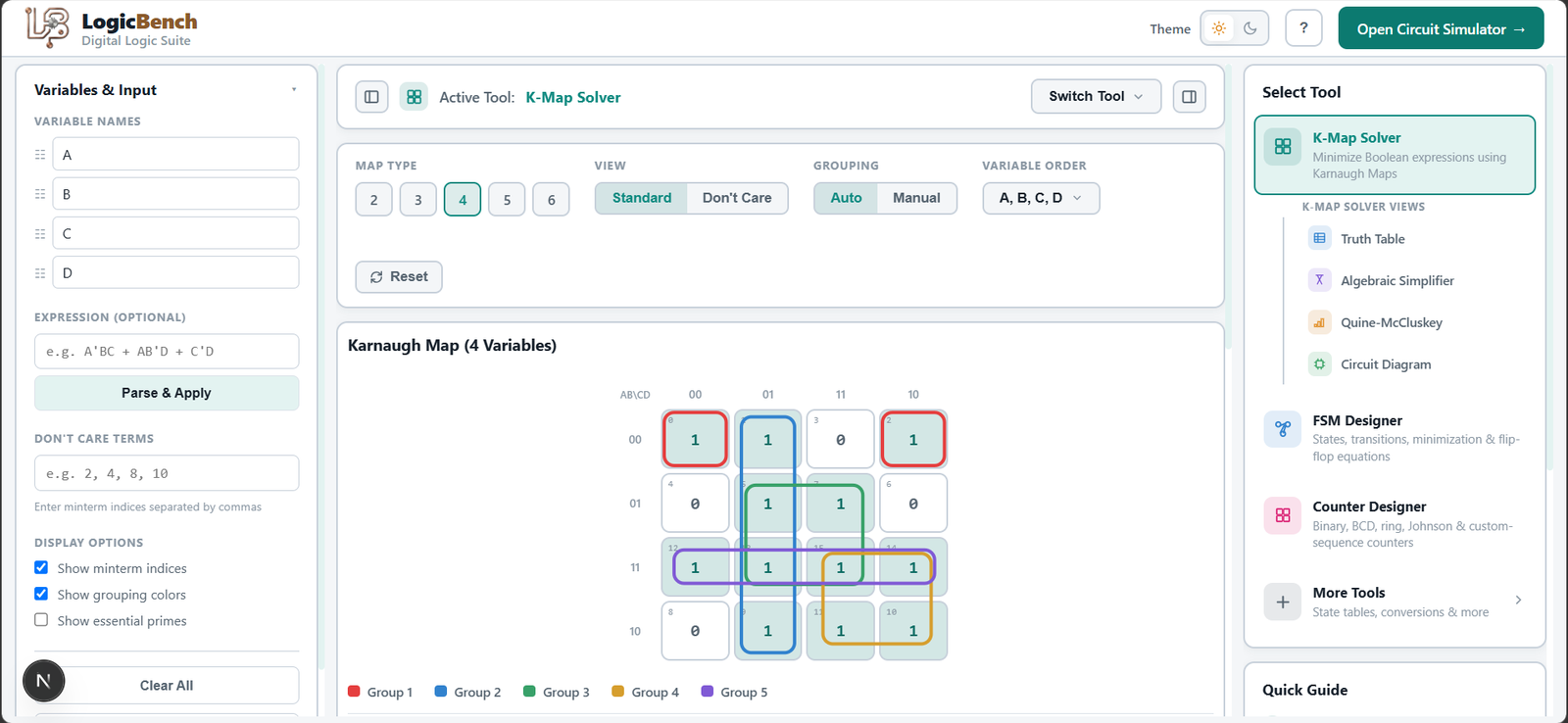
Pick where your problem starts.
K-Map Solver
Click cells or type an expression — get the minimized SOP, the algebraic proof, Quine-McCluskey steps, a truth table, a waveform, and a real gate-level circuit you can build with one click.
Open tool02Circuit Diagram
The unsimplified and minimized gate-level schematics side by side, with exact term and gate counts — and a Build button that wires either one from real ICs in the simulator.
Open tool03Truth Table Generator
The full truth table and a synced timing waveform, generated from the same expression as your K-Map, circuit, and Quine-McCluskey steps — no retyping between tools.
Open tool04Boolean Algebra Simplifier
Every simplification step named — De Morgan's, absorption, consensus — as an algebraic proof alongside the same problem's K-Map grouping and Quine-McCluskey merge passes.
Open tool05FSM Designer
Draw the state diagram or fill in the transition table — either direction auto-generates the other, plus binary/Gray/one-hot state encoding, the excitation table, and per-flip-flop K-map equations, then builds as real flip-flop ICs.
Open tool06Counter Designer
Binary, BCD, Gray, ring, Johnson, mod-N, or a fully custom sequence, up/down/up-down, on D, JK, or T flip-flops — with self-starting lockout recovery, a synchronous-vs-ripple design comparison, excitation equations, waveform, and a real flip-flop circuit.
Open toolWhatever you searched for, it’s in here.
Six digital logic design fields, each usually served by a separate single-purpose site — combined into one workspace that shares data between all of them.
K-Map solver, with a circuit and Quine-McCluskey check
Most K-Map solvers give you a grouped grid and a minimized expression. LogicBench’s also runs Quine-McCluskey as an independent check and draws the unsimplified-vs-minimized gate-level circuit from the same input — open the K-Map solver →
Boolean algebra simplifier with named laws and a K-Map cross-check
Every simplification step names the exact law used — De Morgan’s, absorption, consensus — then checks the result against the same expression’s K-Map and Quine-McCluskey answer — open the Boolean simplifier →
Truth table generator for digital logic, with a timing waveform
Built for digital electronics, not propositional-logic homework: minterms, maxterms, don’t-cares, and a synced timing waveform below the table — open the truth table generator →
Circuit diagram generator — unsimplified vs. minimized, side by side
Turn a Boolean expression, truth table, or K-Map into a gate-level schematic with exact gate counts for both the original and minimized version — open the circuit diagram generator →
FSM designer — state diagram to transition table, both directions
Draw a Mealy or Moore state diagram and get the transition table, binary/Gray/one-hot state encoding, and per-flip-flop D/JK/T K-map equations automatically — or start from the table and get the diagram back — open the FSM designer →
Counter designer — MOD-N, synchronous, asynchronous, lockout-checked
Binary, BCD, Gray, ring, Johnson, MOD-N, or a fully custom sequence, up/down/up-down, on D, JK, or T flip-flops, with self-starting lockout recovery and a synchronous-vs-ripple propagation delay comparison — open the counter designer →
A truth table, a K-Map, and a circuit are the same problem.
Every other free tool in this space — K-Map solvers, Boolean simplifiers, state diagram makers, counter design guides — is a separate, disconnected site built for one step of the problem. LogicBench’s Digital Logic Suite is the only place where a K-Map, its truth table, its algebraic proof, its Quine-McCluskey check, and its gate-level circuit are the same workspace, not six different tabs. Build a K-Map and all four other views are already waiting for you. Draw an FSM’s state diagram and its transition table, excitation table, and flip-flop equations update automatically — and the reverse works too.
And because it’s built on the same engine as LogicBench’s simulator, every result — a minimized expression, an FSM’s flip-flop equations, a counter’s lockout-checked excitation table — builds as a real circuit with actual 74-series ICs and flip-flops, not just a diagram. Once it’s built, extend it or reuse it as a sub-circuit inside a larger design, the same way you’d reuse a verified block on a real breadboard.
6
Connected tools, one shared engine.
7
Counter types — binary, BCD, Gray, ring, Johnson, mod-N, custom.
Solve → Build → Reuse
Every result builds as real ICs in the simulator — extend it or drop it into a larger circuit as a sub-circuit.
FAQ
Is there a free tool that combines a K-Map solver, Boolean simplifier, and circuit diagram in one?
Yes — LogicBench's Digital Logic Suite runs the K-Map solver, Boolean algebra simplifier, truth table generator, and circuit diagram generator off the same input, so a K-Map grouping, its algebraic proof, its Quine-McCluskey check, and its gate-level schematic are one workspace instead of four separate sites.
Can I convert a state diagram to a transition table and design a counter in the same place?
Yes — the FSM designer converts a state diagram to a transition table (and back) with excitation equations, and the counter designer handles binary, BCD, Gray, ring, Johnson, and MOD-N sequences with automatic lockout detection, both inside the same suite as the K-Map and Boolean tools.
Do the six tools in the Digital Logic Suite actually share data, or are they separate calculators?
They share data. Enter an expression once and the K-Map, truth table, Boolean proof, Quine-McCluskey steps, and circuit diagram all update from it — no retyping between tools. The FSM designer and counter designer work the same way between their diagram, table, and equation views.
Can the results from these digital logic design tools be built as a real circuit?
Yes — every tool in the suite has a Build button that wires its result as a real circuit using actual 74-series TTL ICs and flip-flops in LogicBench's simulator, which no calculator-only K-Map, FSM, or counter tool offers. Built circuits can be extended or reused as sub-circuits.
Does the suite compare design tradeoffs, like synchronous vs. asynchronous counters or state encoding choice?
Yes — the counter designer shows a simple binary counter's synchronous design next to its asynchronous (ripple) alternative with the actual worst-case propagation delay for each, and the FSM designer lets you switch between binary, Gray, and one-hot state encoding and see every downstream table and equation re-derive against it. Neither comparison is something a single-purpose K-Map or FSM calculator does.
Free. No signup. No limits.
Pick a tool and start solving — everything stays connected.
Open the K-Map solver